
Check Jambi Vehicle Tax Online via Mobile Phone, Practical and Hassle-Free

News picture Check Jambi Vehicle Tax Online via Mobile Phone, Practical and Hassle-Free
date_range 2026-01-23
schedule 13:07:00
Check Jambi Vehicle Tax Online via Mobile Phone, Practical and Hassle-Free

The Jambi online vehicle tax check service has emerged as a more practical and efficient digital solution. If you previously had to set aside specific time to visit and queue at the Samsat office just to find out your tax amount, you can now complete the process much more easily online.

For vehicle owners with BH license plates, keeping track of tax expiration dates and payment breakdowns is crucial. Beyond avoiding administrative fines, regular checks ensure you remain law-abiding and contribute to regional development. Furthermore, this method is highly useful for those looking to purchase a used car or motorcycle from the Jambi area.

In this article, we will explain practical ways to check Jambi vehicle tax online, right from the palm of your hand. Here is the full explanation for you.
20260123130911cover5414X4Ng.webp

How to Check Jambi Vehicle Tax Online

To check your vehicle tax, several digital platforms are available depending on your preference. Below is a guide on how to check vehicle tax online in Jambi that is both easy to access and practical to use.

1. Check Jambi Vehicle Tax via j-SAMSAT (jambisamsat.net)

The government, through the Jambi Provincial Financial Authority (Bakauda), provides a tax check service via the jambisamsat.net website. This method is a popular choice because it does not require any app installation, making it perfect for a quick check via a mobile or laptop browser.

Steps to check vehicle tax online:

  • Open your browser and visit jambisamsat.net/index.
  • Locate and select the Vehicle Tax (Pajak Kendaraan) menu.
  • Enter the required data, such as the license plate number (Plat BH), the owner's name as listed on the STNK, the PKB (Vehicle Tax) due date, and the STNK expiration date.
  • For public transport vehicles, ensure you check the valid public transport permit option if available.
  • Click the "Submit" button.
  • The system will display the vehicle tax details, including the PKB amount, SWDKLLJ (road accident fund contribution), due dates, and any applicable penalty information.

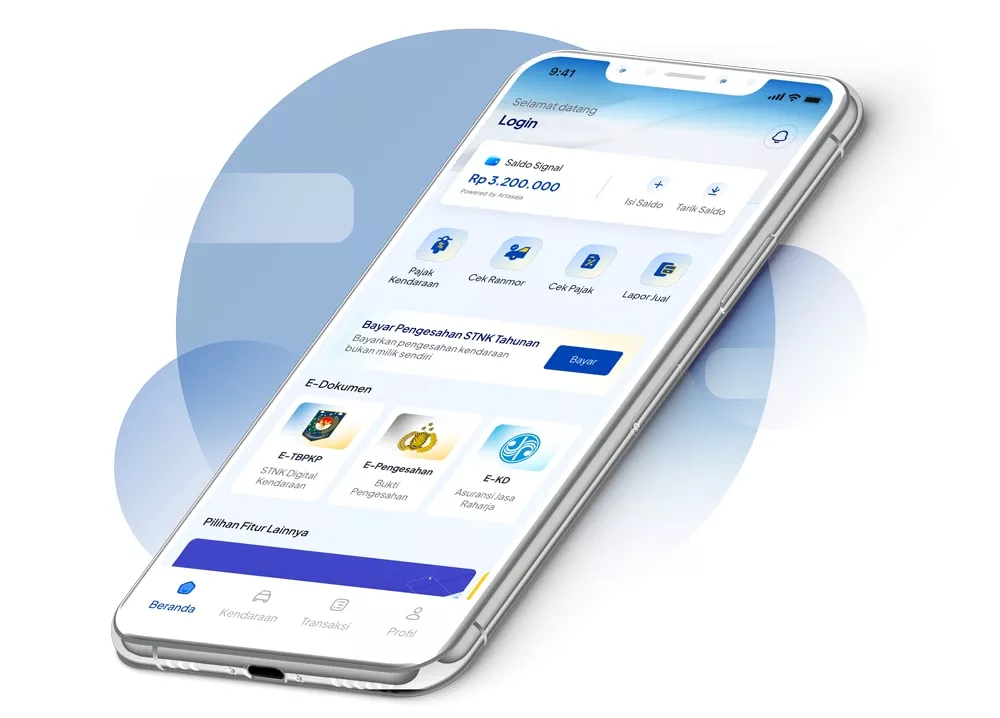
2. Check Jambi Vehicle Tax via the SIGNAL App (Samsat Digital Nasional)

The SIGNAL app is a nationally integrated solution managed by Korlantas Polri. The advantage of this app is that you can not only check Jambi vehicle tax online but also process payments and digital STNK validation.

Steps to check vehicle tax online:

  • Download the SIGNAL app from the Google Play Store or App Store.
  • Register an account by entering your NIK (ID number) and completing facial verification (Liveness Detection).
  • Once the account is active, select the "Add Motor Vehicle" (Tambah Kendaraan Bermotor) menu.
  • Enter vehicle data for your own vehicle or a family member's vehicle listed in the same Family Card (KK).
  • Select the "NRKB" (License Plate Number) menu to view the tax details.
  • The PKB and SWDKLLJ amounts, along with their validity status, will appear automatically.

3. Check Jambi Vehicle Tax Online via Cekpajak.id

Another alternative for checking Jambi vehicle tax is using the service from cekpajak.id. This website is a digital platform connected to the National Police e-Samsat system, designed to help the public check motor vehicle tax conveniently via smartphone.

Steps to check vehicle tax online:
  • Visit cekpajak.id through your device's web browser.
  • Select the region category: Jambi.
  • Enter the required data, specifically the vehicle license plate number (e.g., BH 1234 PH).
  • Press the "Check" (Cek) button to display the vehicle tax details.

Check Jambi Vehicle Tax Online

Sumber: samsatdigital.id

How to Pay Jambi Vehicle Tax Online

1. Paying Jambi Vehicle Tax via the SIGNAL App

If you have completed the check and wish to settle your tax obligations immediately without switching platforms, the SIGNAL app is the most practical solution. Here are the easy steps to make a payment:

  • Once your account is verified and the vehicle data (Plat BH) is added, go to the home screen and select "STNK Validation Registration" (Pendaftaran Pengesahan STNK).
  • Choose the License Plate Number (NRKB) you wish to pay for. The breakdown for PKB and SWDKLLJ will then appear.
  • Click the payment confirmation button to generate a Payment Code (a unique numerical code).
  • Payments can be made through various banking services (ATM, Mobile Banking, or Internet Banking) from partner banks such as Bank Jambi, Mandiri, BRI, BNI, and others.
  • After a successful transaction, you will receive a digital proof of payment (E-TBPKP) and a legally valid e-STNK Validation directly within the SIGNAL app.

2. Paying Vehicle Tax via Bank Jambi Mobile

To simplify vehicle tax payments, you can also use the Bank Jambi Mobile application. Here are the steps:

  • Open the Bank Jambi Mobile app and log in with your username and password.
  • Once logged in, select the Payment (Pembayaran) menu, then choose e-Samsat.
  • Enter the vehicle data as requested.
  • Double-check the displayed vehicle data and the total tax bill.
  • If correct, enter your Bank Jambi Mobile PIN to complete the transaction.
  • After a successful payment, save the proof of payment by taking a screenshot or capturing the screen in the app.
  • Bring this proof of payment to the nearest Samsat office for the validation process.

Now that you understand how easy it is to check Jambi vehicle tax online, you can use these digital services to monitor your tax bills anytime, ensuring your PKB obligations are always paid on time.
20260123131033coverHS2yUF11.webp

Verifying tax status and document authenticity is indeed crucial, especially when you decide to purchase a used vehicle. If you are looking to buy a pre-owned unit with complete paperwork and a transparent process, participating in a JBA Indonesia auction is an excellent choice. As a trusted auction house with an extensive branch network—including Jambi—JBA provides a wide selection of vehicles that have undergone thorough inspection and document verification, allowing you to choose your unit with greater security and peace of mind.

If you have any questions or would like more information about car or motorcycle auctions at JBA, please feel free to contact us via WhatsApp at +62 817-0993-078. Don't forget to follow all of JBA Indonesia's social media accounts to stay updated with the latest news and unit listings!


Related Article

date_range 2026-01-23
schedule 12:54:00
2026 Automotive Exhibition: A Glimpse into Future Car Innovations!

The 2026 automotive...

Baca Selengkapnya
date_range 2026-01-23
schedule 10:09:00
How to Replace a Lost SIM: Stay Calm and Follow This Procedure & Fee Guide

Knowing how to replace a...

Baca Selengkapnya
date_range 2026-01-23
schedule 09:48:00
How to Pay Traffic Fines Online: No Queues, Done in 5 Minutes!

Have you ever panicked upon...

Baca Selengkapnya
News author picture JBA Indonesia

JBA Indonesia

JBA Indonesia adalah balai lelang otomotif tepercaya yang menyediakan berbagai macam pilihan kendaraan bekas. Tiap minggunya, JBA berhasil melelang lebih dari 1000 unit kendaraan untuk para pelanggan JBA.

Contact Us